A WordPress page can have excellent content and still feel weaker than it should because the media experience is unfinished.
The image is too small to inspect. The PDF opens in a new tab. The gallery feels disconnected from the page. The visual effect looks interesting but does not support the message. Each issue is small on its own. Together, they make the site feel less considered.
In 2026, media presentation is part of user experience, SEO, conversion, and brand memory. It is worth treating it as a system.
Give each media type a job
Images, PDFs, videos, and visual effects should not all compete for attention. Each one should help the visitor do something specific.
Images help visitors inspect, compare, and feel the product or story. PDFs help people read structured information. Motion can create atmosphere or signal a brand idea. Embedded videos can teach, demonstrate, or build trust when the subject needs more than text.
| Media type | Best role on the page |
|---|---|
| Images | Inspection, emotion, product detail, portfolio quality, and visual trust. |
| PDFs | Manuals, proposals, guides, forms, lead magnets, and reference documents. |
| Motion | Atmosphere, launch energy, brand distinction, and focused emphasis. |
| Video | Demonstration, walkthrough, education, and proof. |
Make important images inspectable
If an image contains important detail, do not trap it inside a small column. Product photos, artwork, technical diagrams, maps, lookbooks, and portfolio pieces often need a closer viewing mode.
A good image viewer lets people move from overview to detail without losing the page. The visitor should be able to open, zoom, pan, compare, and return naturally.
Keep PDFs readable inside the journey
PDFs are often where the serious information lives. Sending people away to download them can break momentum, especially when the PDF supports a purchase, signup, or support decision.
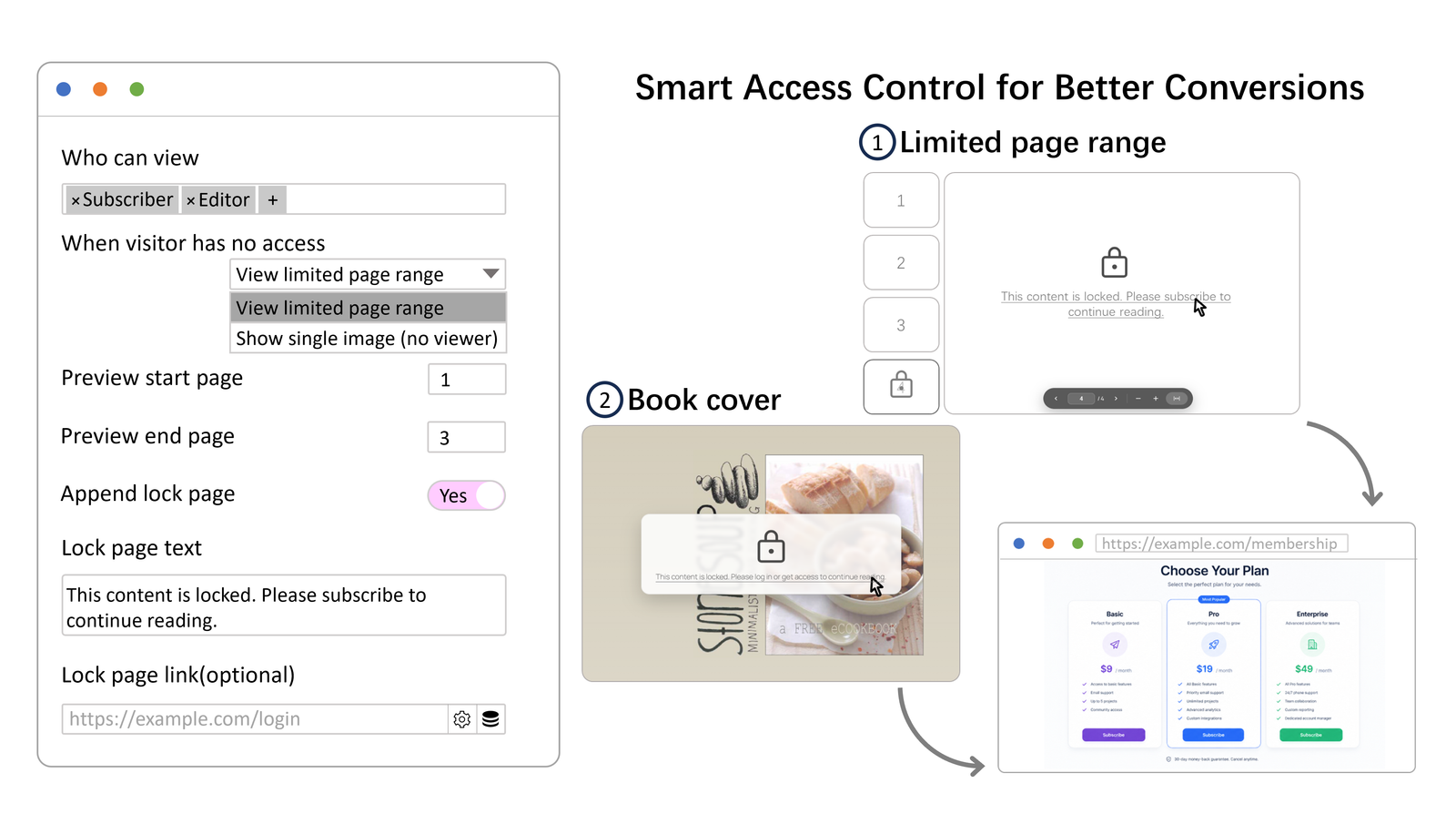
An on-page PDF viewer can keep the reader inside the site while still giving them search, thumbnails, page navigation, and controlled access. For PDF Viewer Nova, plan for the required PDF.js build-file installation before publishing documents.
Use visual effects as brand signals
A creative visual effect should do more than decorate. It should make the page easier to recognize. ASCII visuals, animated type, image treatments, and motion backgrounds work best when they become part of a repeatable identity.
The danger is adding effects because the page feels empty. The better move is to decide what the brand should feel like, then choose the effect that supports that feeling.
Design for the quiet moments
Media interfaces have active states and quiet states. A visitor opens a viewer, stops moving the mouse, reads a document, waits for an image, returns to the page, or changes screen size.
Those quiet states matter. Controls should fade when they are not needed. Documents should remain readable. Visual effects should not block content. Loading states should not feel broken. The polish is often in what happens after the first click.
The wpessentia media stack
wpessentia focuses on this part of WordPress: helping visitors look closer, read better, and remember your brand. Image Click and Zoom improves image viewing and image insight. PDF Viewer Nova improves on-page document reading and access control. WP ASCIIfy helps create distinctive text, image, and motion visuals.
You may not need all three on every site. The useful question is which part of the visitor experience currently feels weakest: inspection, reading, or memory.
Better media makes the page feel more intentional
A good media experience does not need to feel heavy. It needs to feel considered. Visitors should be able to inspect important visuals, read important documents, and remember something about the page after they leave.
That is the standard worth designing toward.